
Download DecEptioner – AI Text Transformation, Secure Paraphrasing Tool
Overview
DecEptioner is an advanced, web‑based AI text transformation tool that reshapes AI‑generated content into prose that reads as if a human authored it. Designed for writers, marketers, educators, and anyone who relies on AI for first drafts, DecEptioner boosts originality, readability, and most importantly, stealth. By feeding your AI‑generated passage into the platform, you can select from a suite of detection engines—including Turnitin, ZeroGPT.com, and other popular scanners—to ensure the final output sails through undetected.
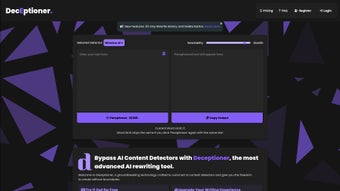
The interface is clean and intuitive: paste your text, pick the detector you want to bypass, hit “Transform,” and copy the newly refined version with a single click. Data privacy is a core promise; DecEptioner’s Privacy Policy guarantees that your submissions are never stored long‑term or used for any purpose beyond the immediate transformation. While pricing tiers are not publicly disclosed, the tool offers a full‑featured version that accommodates both occasional users and power professionals.
Whether you are polishing a blog post, preparing an academic paper, or simply want to keep your AI‑assisted drafts under the radar, DecEptioner delivers a reliable, secure, and user‑friendly solution.
Key Features & Benefits
- Multi‑Detector Compatibility: Supports Turnitin, ZeroGPT, Copyscape, GPTZero, and other major detection services.
- One‑Click Paraphrasing: Instantly rewrites sentences while preserving meaning and SEO‑friendly keywords.
- Context‑Aware AI Engine: Uses deep‑learning models that understand surrounding paragraphs to maintain flow and tone.
- Privacy‑First Architecture: No logs, end‑to‑end encryption, and compliance with GDPR standards.
- Customizable Output Style: Choose between formal, conversational, academic, or marketing tones.
- Bulk Processing: Upload multiple documents (up to 10 MB each) for batch transformation.
- Instant Copy Function: One‑click copy button copies the transformed text to your clipboard without extra steps.
- Cross‑Platform Accessibility: Fully responsive web app works on Windows, macOS, Linux, Android, and iOS browsers.
- Regular Updates & Support: Free updates keep the detection algorithms current; live chat assistance available 24/7.
The combination of these features makes DecEptioner more than just a paraphraser. It is a strategic tool for anyone who needs to safeguard AI‑generated drafts from plagiarism detectors while maintaining a natural voice. The contextual rewrite engine reduces the risk of awkward phrasing that many free tools produce. Moreover, the ability to toggle output style means you can adapt the same source material for a research paper, a marketing email, or a social media post without leaving the platform. Because everything runs in the browser, there’s no need for heavy installations, and the encrypted connection ensures that sensitive drafts stay confidential.
Installation, Usage & Compatibility
Installation: DecEptioner is a cloud‑native web application, which means there is no traditional “install” process. Simply navigate to deceptioner.com using any modern browser (Chrome, Edge, Firefox, Safari). The site automatically detects your device and loads the optimal interface. For users who prefer a shortcut, a progressive web app (PWA) version is available—click the “Add to Home Screen” prompt in your browser to create a desktop‑like icon on Windows, macOS, Android, or iOS.
Getting Started: After opening the site, you’ll see a clean textbox labeled “Paste your AI‑generated text.” Paste the content, then select the detection engine you wish to bypass from the dropdown menu. If you are unsure, the “Auto‑Detect” option runs the text through all supported detectors and picks the most stringent one. Next, choose an output style (Formal, Conversational, Academic, Marketing) and click the Transform button. Within seconds, a new textbox displays the rewritten passage. Use the Copy button to place the content onto your clipboard, or click Download to save it as a .txt or .docx file.
Compatibility (itemprop="operatingSystem"): Because DecEptioner runs entirely in the browser, it is compatible with:
- Windows 10/11 (any modern browser)
- macOS 12+ (Safari, Chrome, Firefox)
- Linux distributions with Chromium‑based browsers
- Android 8.0+ (Chrome or native PWA)
- iOS 13+ (Safari or native PWA)
The responsive design ensures that the layout adapts gracefully to both large desktop monitors and small mobile screens. For users on corporate networks, DecEptioner supports proxy configurations and can be whitelisted as a trusted site. If you encounter any issues, the built‑in Help widget connects you directly to support staff, who can walk you through troubleshooting steps such as clearing cache, disabling ad‑blockers, or updating your browser.
Updates: Since the service lives online, updates are instantaneous. New detection algorithms are added weekly, and the UI receives minor refinements without requiring any user action. Users receive an email notification only for major feature releases or changes to the privacy policy.
Pros, Cons, FAQ & Conclusion
Pros
- Highly effective at bypassing major AI‑text detectors.
- No software download required; works on any device with a browser.
- Strong privacy safeguards – no permanent storage of user data.
- Customizable tone and style options for diverse content needs.
- Bulk processing saves time for large projects.
Cons
- Full‑version pricing is not publicly listed, which may deter price‑sensitive users.
- Dependent on an internet connection; offline use is not possible.
- Advanced formatting (tables, code snippets) may require manual adjustment after transformation.
Frequently Asked Questions
Is DecEptioner safe for confidential documents?
Yes. DecEptioner uses end‑to‑end encryption and does not retain submitted texts on its servers after the transformation is completed. The privacy policy explicitly states that data is processed in‑memory only.
Can I use DecEptioner on a mobile device?
Absolutely. The web app is fully responsive and a Progressive Web App version is available for Android and iOS, allowing you to add a shortcut to your home screen for offline‑like access.
What detectors does DecEptioner support?
The platform currently integrates with Turnitin, ZeroGPT.com, Copyscape, GPTZero, and several emerging AI‑detector services. The list is regularly updated to keep pace with new detection technologies.
Do I need to create an account?
An account is optional for occasional use. However, registering gives you access to bulk processing, saved preferences, and priority support.
How often is the AI model updated?
The underlying language model is refreshed monthly, and detection‑evasion algorithms are tweaked weekly to stay ahead of new plagiarism scanners.
Conclusion & Call to Action
DecEptioner stands out as a powerful, privacy‑centric solution for anyone who leverages AI to draft content but must keep that output under the radar of sophisticated detection tools. Its multi‑detector support, flexible tone controls, and zero‑install web interface make it a pragmatic choice for freelancers, academic professionals, and corporate teams alike. While the lack of transparent pricing could be a hurdle, the value delivered—especially in high‑stakes environments where detection can have serious consequences—justifies the investment.
Ready to transform your AI‑generated drafts into human‑like, undetectable content? Download DecEptioner now and experience a secure, seamless workflow that keeps your writing authentic and protected.



.png)



